
A plan around you
Choose your goal, running days and experience. Mauv gives you a week-by-week plan with a purpose for each session.
RUNNING PLANS. MADE YOUR OWN.
Mauv is a running app for iPhone, with personalised training plans, editable workouts for Apple Watch and AI feedback on your runs.
Made for iPhone and Apple Watch.

01 / THE BIG PICTURE
A first 5K. A race on the calendar. A reason to run more regularly. Start with what you’re working towards.
Choose your goal, running days and experience. Mauv gives you a week-by-week plan with a purpose for each session.
Open a workout and adjust its steps, intervals, recoveries, pace or heart-rate targets. Review it before you run.
See your next session on Home and explore the week in Plan. End a plan and start another when you need a fresh start.

APPLE WATCH + APPLE HEALTH
Send your workout to Apple Watch. Follow it in Apple’s Workout app, with the structure you reviewed in Mauv.
Back on your iPhone, explore your completed runs through Apple Health. The run is yours. So is the chance to understand it.
After the finish lineApple Watch required to follow a workout on your wrist.
02 / YOUR WORDS, A WORKOUT
Describe it in plain language, or bring a workout screenshot. Mauv turns it into a structured session you can review and edit.
Keep the warm-up. Change the repeats. Make the recovery easier. You get the final say.
Make your first workout“A 35-minute easy run, with 5 minutes to warm up and 5 minutes to cool down.”
| Block | Time | Effort |
|---|---|---|
| Warm up | 5 min | Easy |
| Easy run | 25 min | Easy |
| Cool down | 5 min | Easy |
“10 minutes easy, then six 2-minute intervals with 2-minute jogs between. Finish with 8 minutes easy.”
| Block | Time | Effort |
|---|---|---|
| Warm up | 10 min | Easy |
| 6 × 2 min intervals | 12 min | Hard |
| 5 × 2 min recoveries | 10 min | Easy |
| Cool down | 8 min | Easy |
“10 minutes easy, 20 minutes at tempo, then a 10-minute cool-down.”
| Block | Time | Effort |
|---|---|---|
| Warm up | 10 min | Easy |
| Tempo | 20 min | Tempo |
| Cool down | 10 min | Easy |
Illustrative example. In Mauv, review and edit the generated workout before you run.
Intervals example selected.03 / THERE’S MORE TO A RUN THAN THE FINISH
Your older runs have a place here, too.
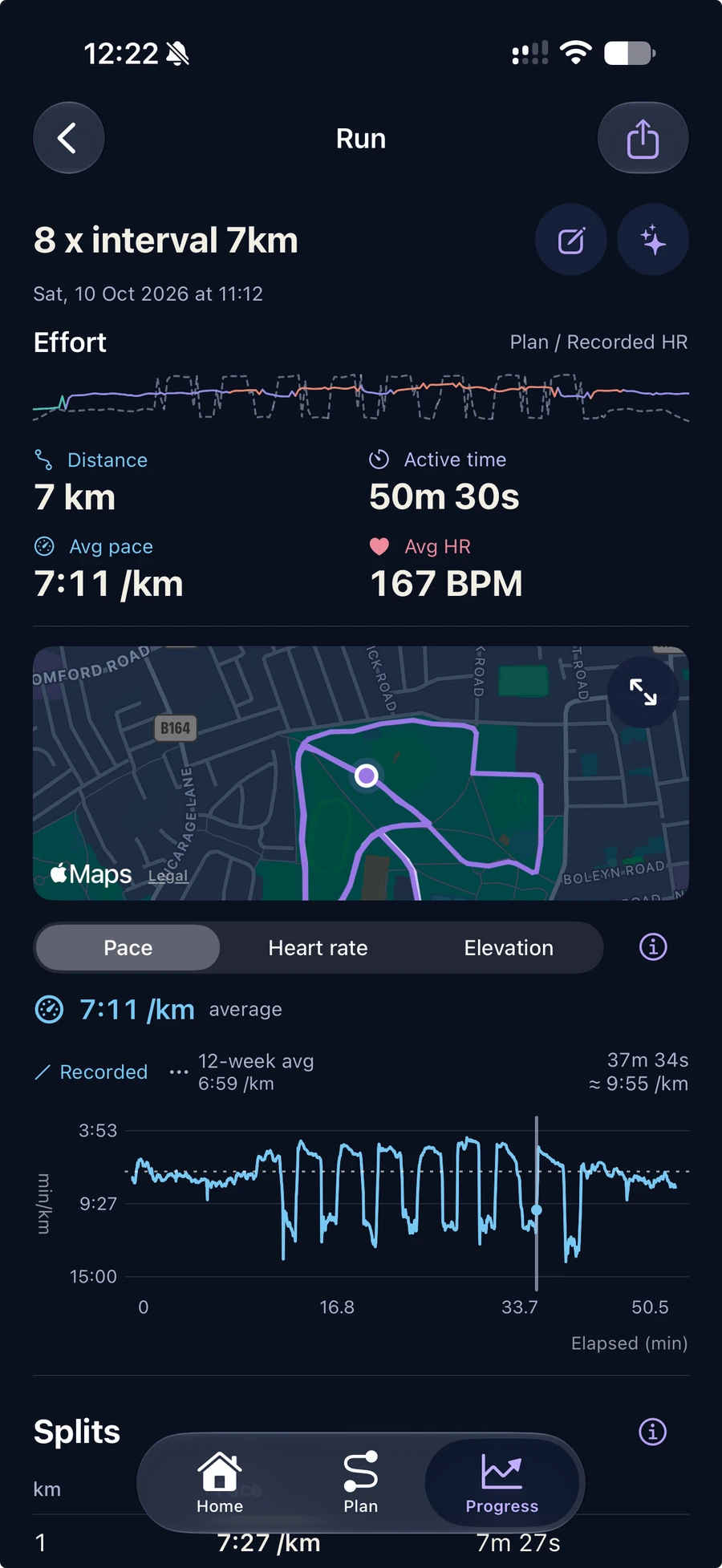
Browse running workouts from Apple Health, open a run and add how it felt. Get AI feedback on your effort, what went well and what to focus on next.
MAUV FOR IPHONE
Create a running plan, shape the session and take it outside. Then come back with a little more understanding of your run.
For iPhone. Follow structured workouts on Apple Watch.
Privacy, in plain languageCreate a running plan, explore its weeks and sessions, edit individual workouts, and compose a run from a description or workout screenshot. Send a session to Apple Watch, browse runs from Apple Health, and get AI feedback on recent or older runs. You can also end a plan and start another.
You can create plans, compose and edit workouts, and explore your run history on your iPhone. To follow a Mauv workout on your wrist, you need a compatible Apple Watch. You run the session in Apple’s Workout app. Mauv requires iOS 26.5 or later. Check the App Store listing for device compatibility when the download link is available.
Yes. With your permission, Mauv imports running workouts saved in Apple Health, including older runs. Open a run, add how it felt, and get AI feedback. Your original runs stay in Apple Health.
Mauv asks for permission before sharing relevant workout descriptions, chosen images, profile information or run metrics with its AI services. AI sharing is optional and can be turned off in Settings. Read the privacy policy for details about the information shared and the service providers. Read the privacy policy.